
Find what matters
Focus on the councils, locations and care services that match your company’s interests.
 PricingLoginStart free
Give your team a clearer way to find suitable tenders, check the evidence and decide where to invest their bid time.
Free plan, no card needed. Find your organisation on the CQC register or Companies House and your profile fills itself in.
Built by TenderLab: a 92% win rate across 200+ care tender submissions. See our track record
See how your evidence builds a clearer pictureTenderLab One is built by TenderLab, a UK bid writing consultancy for health and social care providers. Our team has a 92% win rate across more than 200 tender submissions.
TenderLab One connects discovery, bid decisions, your tender library and preparation in one procurement workspace.
Focus on the councils, locations and care services that match your company’s interests.
See readiness, requirements and company fit as distinct measures, with gaps kept visible.
Bring supporting evidence, released briefings and the next actions into a connected workspace.
See populated portal screens, visible scores and the information your team uses to prepare a bid.
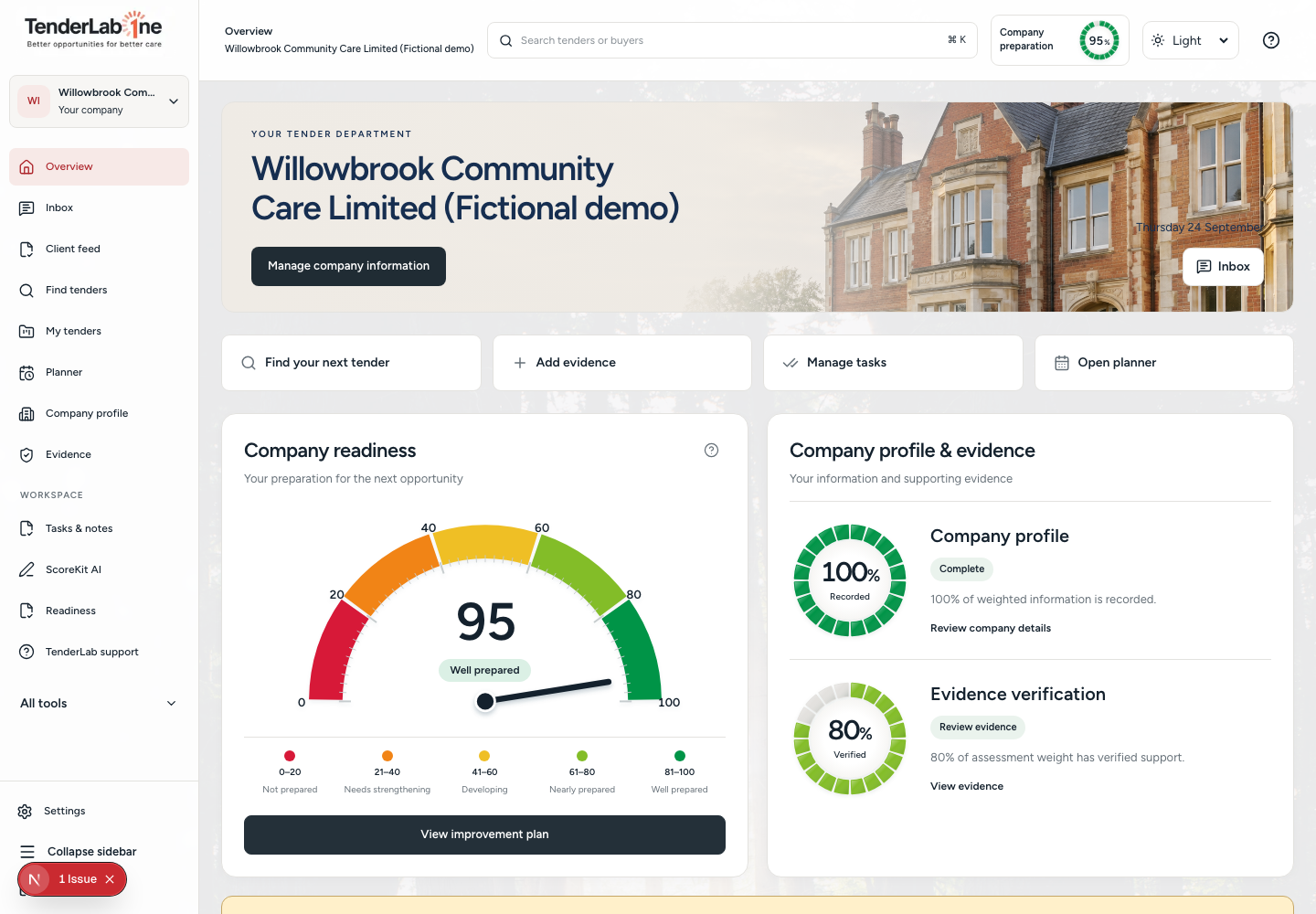
See your profile, evidence and preparation in one place.
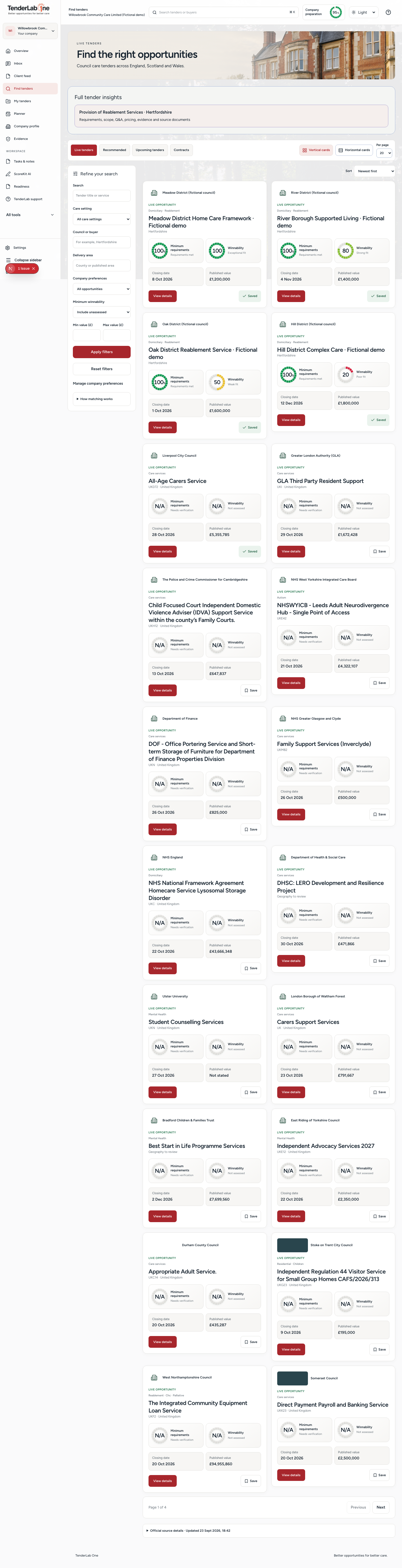
Compare opportunities with visible scores and requirements.
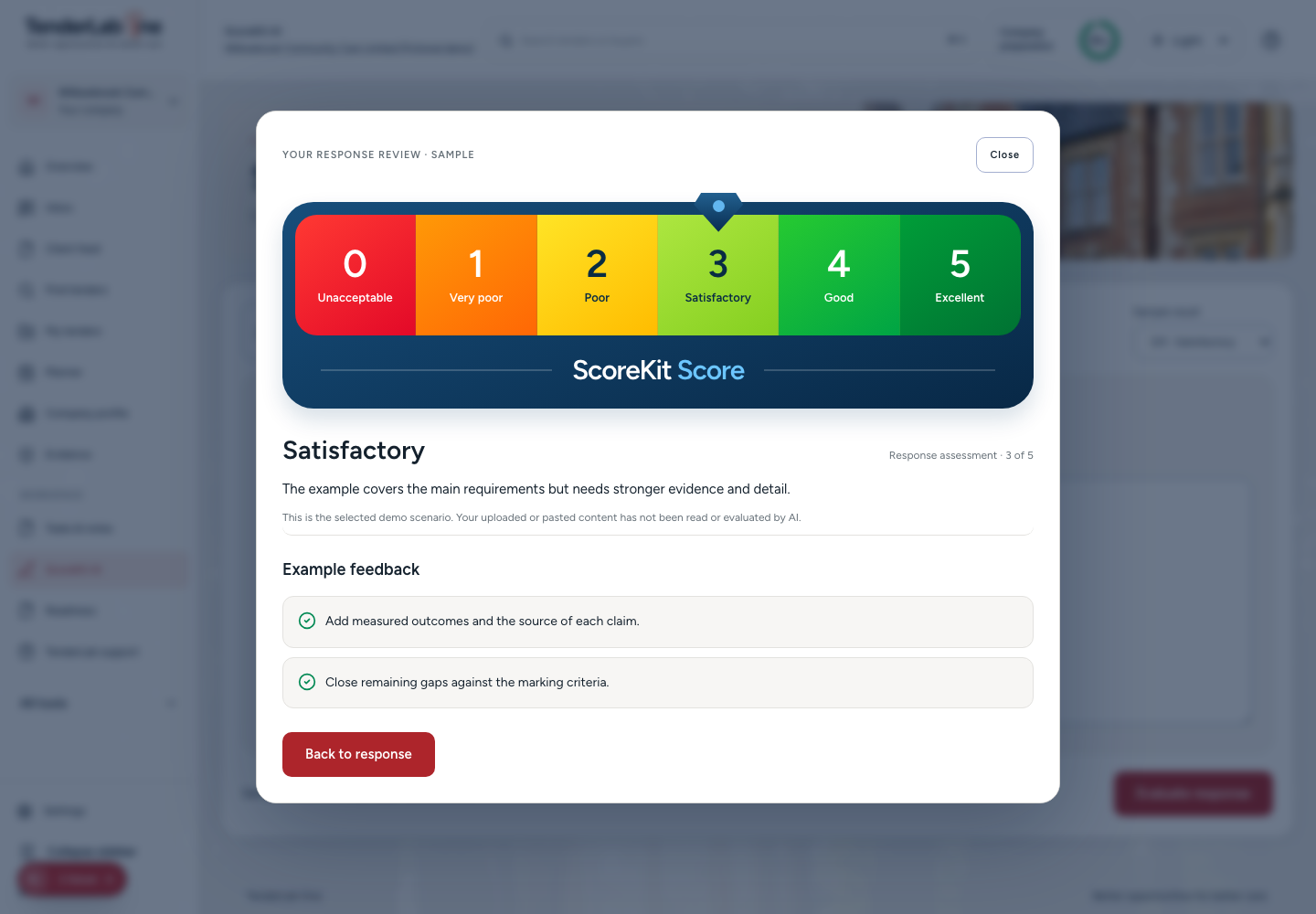
Review the sample assessment and its improvement feedback.
Keep the company picture connected to the work ahead.
Your procurement department, connected: discover suitable tenders, assess the opportunity, build your library and organise the work to bid.
Focus on your care services, councils and locations. Move from a broad list of notices to opportunities worth investigating.
See tender matching →Keep saved opportunities, source links, released briefings and requirements together. Organise company evidence for the work ahead.
See your company workspace →Bring deadlines, documents and next actions into view. Strengthen your preparation before investing further resources.
See response review →Minimum requirements: check whether the company meets the buyer’s mandatory conditions. Read any conditional or unverified checks, not just the number.
TenderFit: assess the strength of relevant company evidence for this tender and lot. It is a 100-point assessment, not a percentage chance of winning.
Follow the evidence review →All checks passed in this example
Strong fit in this example
The first answers “Do we meet the conditions?” The second answers “How strong is our evidence?” Neither is a promise of an award.
Each assessed area is rated from zero to five against eligible supporting evidence, then contributes to the weighted 100-point total. Missing areas retain their weight, so an incomplete assessment is not inflated to look complete.
Verified evidence coverage is shown separately. Strong client-provided evidence may be rated where accepted, but is not labelled independently verified. A mandatory failure overrides the score. A public notice without an assessment remains unassessed.
Care hours are not the same as paid workforce hours. Travel, employment costs, downtime and absence can change whether a package is affordable and deliverable.
Bring your own figures into a saved commercial plan. See the target rate and capacity gap, record mandatory checks, then let an authorised manager approve, watch or decline the opportunity.
Ask to see commercial planning →One worker per visit, £15 paid hourly, 20% employment on-cost, 80% utilisation and 15 minutes of paid travel per package hour.
This illustration uses two miles at £0.45, £2 overhead per package hour and 5% contingency. Replace every assumption with your own sources. It does not include a route, payroll or commissioner-rate feed.
Calculate hourly costs, weekly contribution and a target margin. Keep the source, date and assumptions with the plan instead of leaving the reasoning in a spreadsheet.
Compare required paid hours with available hours after an absence allowance. Check skills, shifts and geography before treating capacity as covered.
Unresolved mandatory checks, weak margins and capacity gaps block approval. Share a plan for staff review, create a follow-up and retain each version in the timeline.
Financial plans are permission-controlled. TenderLab staff see only plans a client shares, and the client keeps approval authority.
Actual application screens · Fictional demonstration data
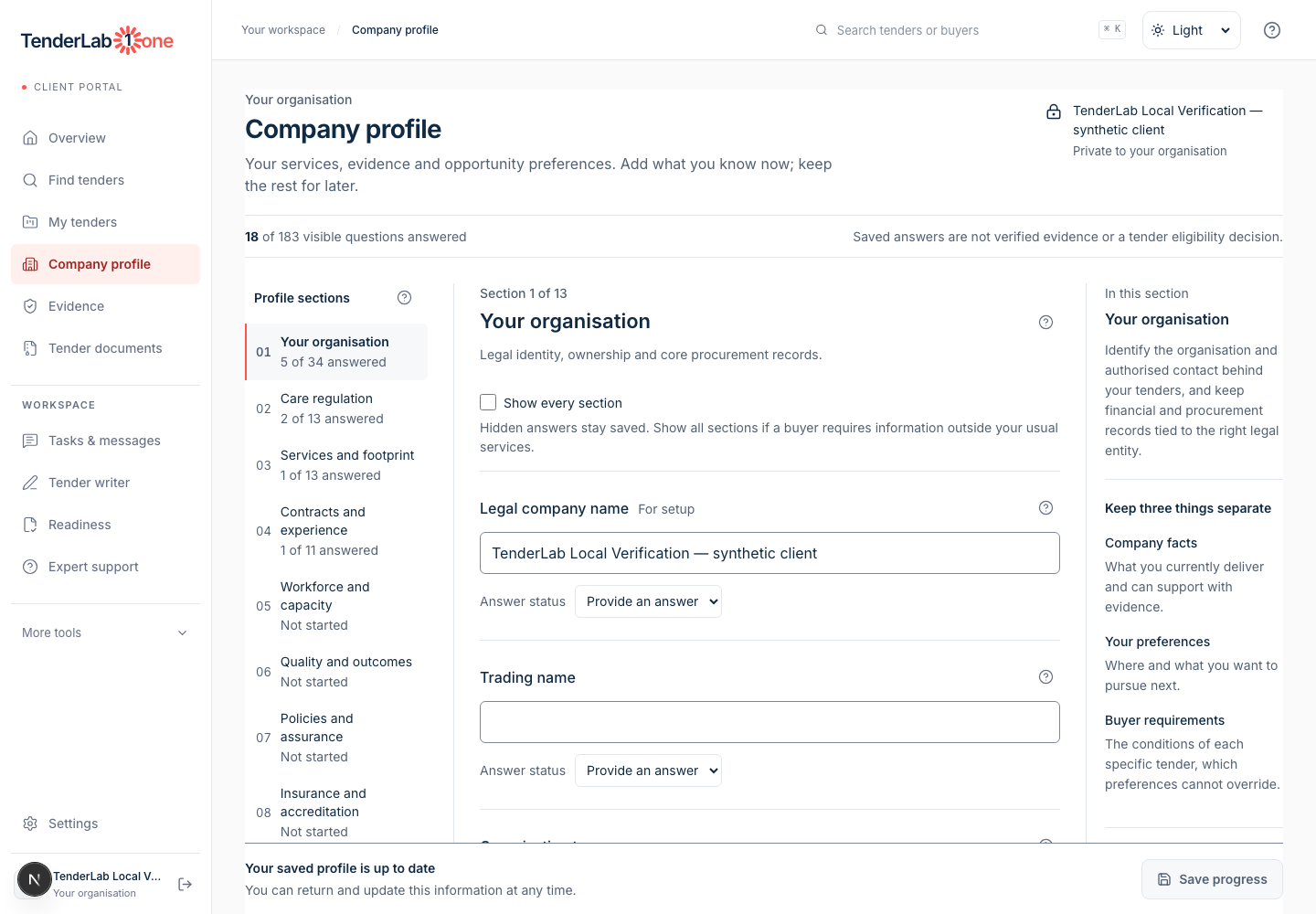
When company information sits across documents and inboxes, gaps are easy to miss. Bring your profile and evidence into one workspace, then see what is recorded, verified and still needs attention.
Actual application screens · Fictional demonstration data
A tender can look relevant and still be wrong for your company. Explore opportunities by care setting, council and location, then review minimum requirements and assessed TenderFit before deciding what to pursue.
Actual application screens · Fictional demonstration data
A score needs an explanation. See a sample response review with its assessment scale and improvement feedback together, so the next action is clearer than a number alone.
Follow an illustrative evidence review from 0 to 100. See how the company picture becomes clearer as checks are completed.
Demonstration only. This is not your company score or a prediction of winning.
Record your services, locations and delivery experience. An empty profile tells you what is missing, not that you qualify.
Record your services, locations and delivery experience. An empty profile tells you what is missing, not that you qualify.
Connect your registrations, policies and track record. A document being uploaded does not mean its contents have been verified.
Review validity, dates and relevance. Keep verified checks separate from information that still needs confirmation.
Assign missing evidence and outstanding checks to your team. Review mandatory tender conditions separately, even when preparation looks strong.
A completed evidence review gives your team a clearer starting point. Assess this tender’s requirements, delivery capacity and price before deciding whether to bid.
Compare tenders with your company’s services and evidence. Review the requirements, organise your documents and keep track of deadlines and next steps, all in one workspace.
Your proposal confirms platform access, enabled features, onboarding and support. Explore the product with your own priorities before agreeing the scope.
Compare plans →Tender writing, bid advice and expert review are separately scoped services. Agree the work, deliverables and fees with TenderLab before it begins.
Explore TenderLab services →TenderLab One is for UK health and social care providers that need a structured procurement and bidding function. It supports owners, directors, business-development teams and bid teams in domiciliary care, supported living, residential care and children’s services, whether they have a dedicated tender team or manage this work alongside day-to-day operations.
It brings the work of your procurement department into one portal: finding relevant public-sector tenders, checking whether they suit your company, deciding which to pursue, organising tender information and evidence, and keeping preparation on track. It supports your team’s decisions rather than simply sending a list of notices.
Use your company’s services, target councils and locations to narrow the opportunities you review. A matching preference is a starting point, not proof that you qualify. Reviewed tender briefings and company evidence then help you assess the specific requirements and delivery fit.
The workspace brings together saved opportunities, tender details, source links, released briefings and requirements. Your company evidence sits alongside this work so you can organise supporting documents and reuse relevant material. Check the original buyer documents for the latest requirements, deadlines and changes.
Company readiness shows your preparation. The minimum-requirements meter shows the assessed position against mandatory conditions for a particular tender. The TenderFit meter shows evidence-weighted strength for that tender and lot. ScoreKit is a separate response-review feature. These measures answer different questions and should not be combined into a single pass mark.
The product’s assessment model weights eight areas: service experience, outcomes, workforce, commercial strength, geographic fit, operational systems, mobilisation and partnerships. Eligible evidence ratings contribute to a 100-point total. The breakdown shows what has been assessed and how much is verified. Missing evidence is not treated as a pass, and an incomplete assessment remains provisional.
Start with the mandatory requirements, then review evidence strength, gaps, deadlines and delivery capacity. The current recommendation rule requires an identified lot, resolved mandatory checks, all weighted areas assessed and a score of at least 70. Any permitted conditions still need to be completed on time. A mandatory failure overrides a high score. Your team makes the final bid decision.
No. It is an evidence-strength assessment, not a probability of winning or buyer approval. A score of 85 does not mean an 85% chance of award. The buyer’s evaluation, the submitted response, pricing and competing bids still determine the outcome.
It gives the team a connected workspace for the work, not a substitute for judgement, verified evidence or client approval. Tender writing, expert review and consultancy are separately scoped unless your agreement includes them.
Yes. The screenshots are actual portal captures with fictional demonstration data. Example scores explain the workflow, not the position of a real company. ScoreKit images show a sample review format; live AI evaluation is not yet available.
No. It supports procurement and tender preparation, not care records, medication management or rostering.
The commercial decision board combines your entered pay, employment costs, travel, mileage, overhead, contingency and target margin. It shows a break-even and target rate, weekly contribution and the paid workforce hours required. These are planning calculations, not automatic quotes. Use current sources and account separately for complex visit patterns, TUPE and mobilisation.
Company owners, admins and colleagues assigned Finance and pricing can access commercial plans. Staff review is available only when you share a plan with TenderLab. Only a company owner or admin can record approval. Changes to the assumptions return the plan to draft, and the timeline preserves the previous versions and reasons.
Compare the plans, then contact the team with your company details and tender priorities. A demo request does not start a subscription or take payment. Your agreement confirms the features, access and support included.
Product demonstration · Fictional records and illustrative scores